
Microsoft Dynamics integration — the flow from prepare to callback
Dynamics does not print: it prepares the cheque by API and gets a link an employee opens to print. The row is written before printing; completion confirms it and sends the result and image to Dynamics. Eight steps, four endpoints, three duplicate guards.
Last updated: 2026-10-24
On this page
The idea
The app never prints on anyone’s behalf — printing is an employee’s action from their browser on their printer. So the integration has two halves: an API call that prepares, and an employee session that prints.
[Dynamics] ──(1) POST /api/cheque-log/dynamics  with API key──▶ [Cheques] prepares, caches a draft (1 h)
[Dynamics] ◀──(2) launch_url + launch_token ───────────────────┘
    │ (3) shows the link to the employee, or redirects them
    ▼
[Employee browser — logged in]
    (4) opens /bank/{id}/template/{id}?dynamics_launch=TOKEN
    (5) GET  …/launch/{token}           loads the draft into the print screen
    (6) POST …/launch/{token}/register  ⟹ row written, unconfirmed — then prints from the normal screen
    (7) POST …/launch/{token}/complete  after the print dialog closes ⟹ row confirmed
[Dynamics] ◀──(8) callback HTTP POST «cheque.printed» ─── [Cheques]
Step 1 creates no cheque — no row until step 6 (registration before printing). Steps 5, 6 and 7 are browser session calls, not callable from a server.
Step 1 — prepare: POST /api/cheque-log/dynamics
(Alias POST /api/cheque-logs/dynamics.) Fields and their map in Fields & template.
curl -s -X POST "APP_URL/api/cheque-log/dynamics" \
  -H "X-API-KEY: KEY" -H "Content-Type: application/json" -H "Accept: application/json" \
  -d '{
        "external_id": "DYN-1001",
        "bank_id": 2,
        "payee_name": "شركة النيل للتوريدات",
        "net_amount": "1250.50",
        "currency_code": "EGP",
        "issue_date": "2026-10-15",
        "document_no": "PV-1001",
        "memo": "دفعة مورّد"
      }'
200 (or 302 in redirect mode redirect: true):
{
  "success": true,
  "message": "تم تجهيز الشيك للمعاينة والطباعة",
  "action": "prepared",
  "launch_token": "<48 chars>",
  "save_mode": "after_print",
  "data": { "bank_name": "بنك مصر", "template_name": "بنك مصر - نموذج 1", "recipient_name": "…",
            "amount": "1250.50", "external_source": "microsoft_dynamics", "external_id": "DYN-1001",
            "request_hash": "…", "template_selection_required": false, "available_templates": [] },
  "preview_url": "APP_URL/bank/2/template/5?dynamics_launch=…",
  "launch_url": "…", "redirect_url": "…", "print_url": "…"
}
The four URLs are one value under four names. Keep launch_token and hand launch_url to the employee. The draft lives one hour (DYNAMICS_LAUNCH_TTL_SECONDS).
template_selection_required: true = the bank resolved but the template did not (several active templates without a single featured one): the link becomes /bank/{id}?dynamics_launch=… and the employee picks the template on screen — available_templates lists the options.
Steps 5, 6 and 7 — the employee session
| Endpoint | Guard | Response |
|---|---|---|
GET /api/cheque-log/dynamics/launch/{token} |
session + active company | 200 with the draft (data + resolved_bank_id + resolved_template_id) · 404 {"message":"Dynamics launch draft not found or expired."} |
POST /api/cheque-log/dynamics/launch/{token}/register |
session + print-batch permission | 201 action: "registered" · 200 reused · 422 «الصفحة قديمة — حدّثها ثم أعد الطباعة» without the render snapshot, and validation refusals (including a duplicate cheque number, the leaf guard, and «تاريخ الشيك يجب أن يقع بين سنة 2000 وسنة 2100.» (cheque date must fall between 2000 and 2100) on cheque_date after the registration body is merged with the draft) — all before the paper |
POST /api/cheque-log/dynamics/launch/{token}/complete |
session + print-batch permission | 200 action: "confirmed" · 200 reused on repeat · 422 «الصفحة قديمة…» with no registered row · «سجل هذا الشيك حُذف بعد تسجيله قبل الطباعة — لا يمكن إكماله.» |
The screen calls all three itself; what matters to you: the row is written at registration, before the paper, unconfirmed, and completion after the paper confirms it and sends the callback without writing a row — a completion with no prior registration is refused as a stale page. The registration body overrides the draft field by field except the company; the completion body is the image alone. With cheque_leaf_id (in the draft or in the registration body): prepare checks the leaf without reserving it, registration locks, checks and reserves it for the row (cheque number, book and account come from it), and completion marks it used — refusals use the leaf guard messages. The draft's leaf passes without the “next leaf” restriction; a leaf the employee picks on the screen during the launch needs the “pick a leaf from the book” permission unless it is the next one. Registration checks the references (account · book · leaf · partner) against the draft's company.
The cheque image at completion
The print screen captures the cheque image after printing, from the same data the paper was drawn from. Printing no longer waits for the image.
image_base64is optional: a JPEG image (quality 0.72) as a data URI (data:image/jpeg;base64,...).- If capture fails after one extra attempt, the cheque is still confirmed and the callback is sent without an image (
image_base64: null) — the paper is already out, and the record does not depend on the image. save_cheque_imageis ignored on this endpoint.- Storage: the image is passed to the callback as is and no copy is stored on the server (no file, no watermark). The completion response returns
image_url: nullandimage_saved: false.
Example request:
{
  "image_base64": "data:image/jpeg;base64,/9j/4AAQ..."
}
تنبيه
liner_enabled and two_lines override the draft: absent from the registration body = false — a cheque prepared with the liner on and registered without re-sending it is stored without a liner.
The row is written at registration with printed_at (the registration time) · printed_by = the employee · printed_status = false until completion · initial status from the direction · external_source · external_id · request_hash from the draft, not the request. Completion flips printed_status to true and changes nothing else. Except the book leaf: it becomes used in the same completion transaction.
Step 8 — the callback
After confirmation, one HTTP POST to DYNAMICS_PRINT_CALLBACK_URL with event cheque.printed, the cheque data and its image (when captured). One synchronous attempt, no retry (retried only if completion is called again and the previous attempt was not sent). Its result appears in the completion response under dynamics_callback: sent · failed · skipped (no URL configured).
Image fields in the payload:
| Field | Value |
|---|---|
image_url |
Deprecated and always null — kept in the payload so existing parsers don't break |
image_base64 |
The JPEG captured after printing, without a watermark, or null when capture failed |
image_mime_type |
image/jpeg, or null without an image |
image_file_name |
cheque-<id>.png — the .png extension is kept for compatibility; the content is JPEG |
What the employee sees: “saved and print status sent to Dynamics” · “saved locally but not sent because the link settings are incomplete” · “saved locally but the image and print status could not be sent”.
A cheque printed but never completed — “resend completion”
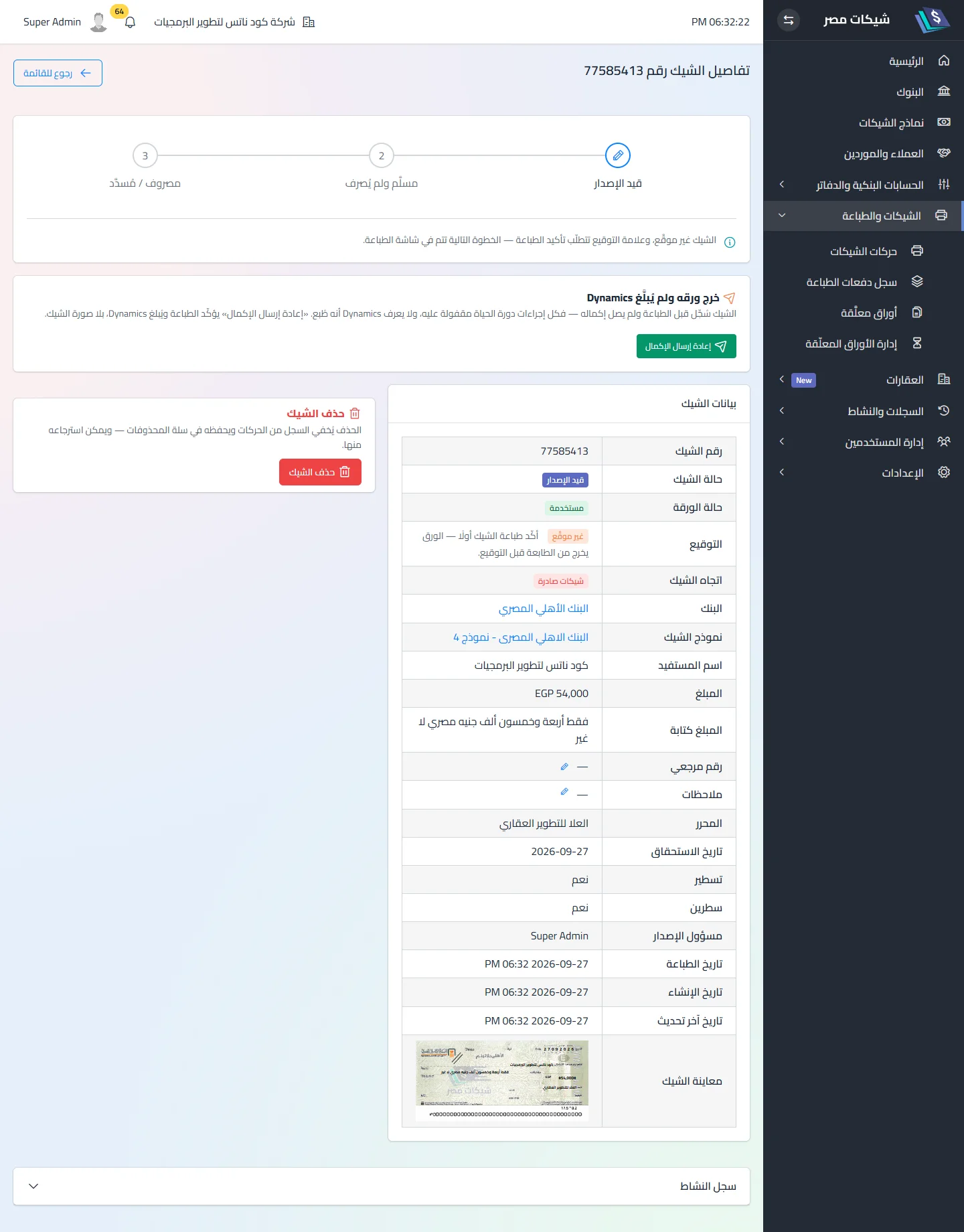
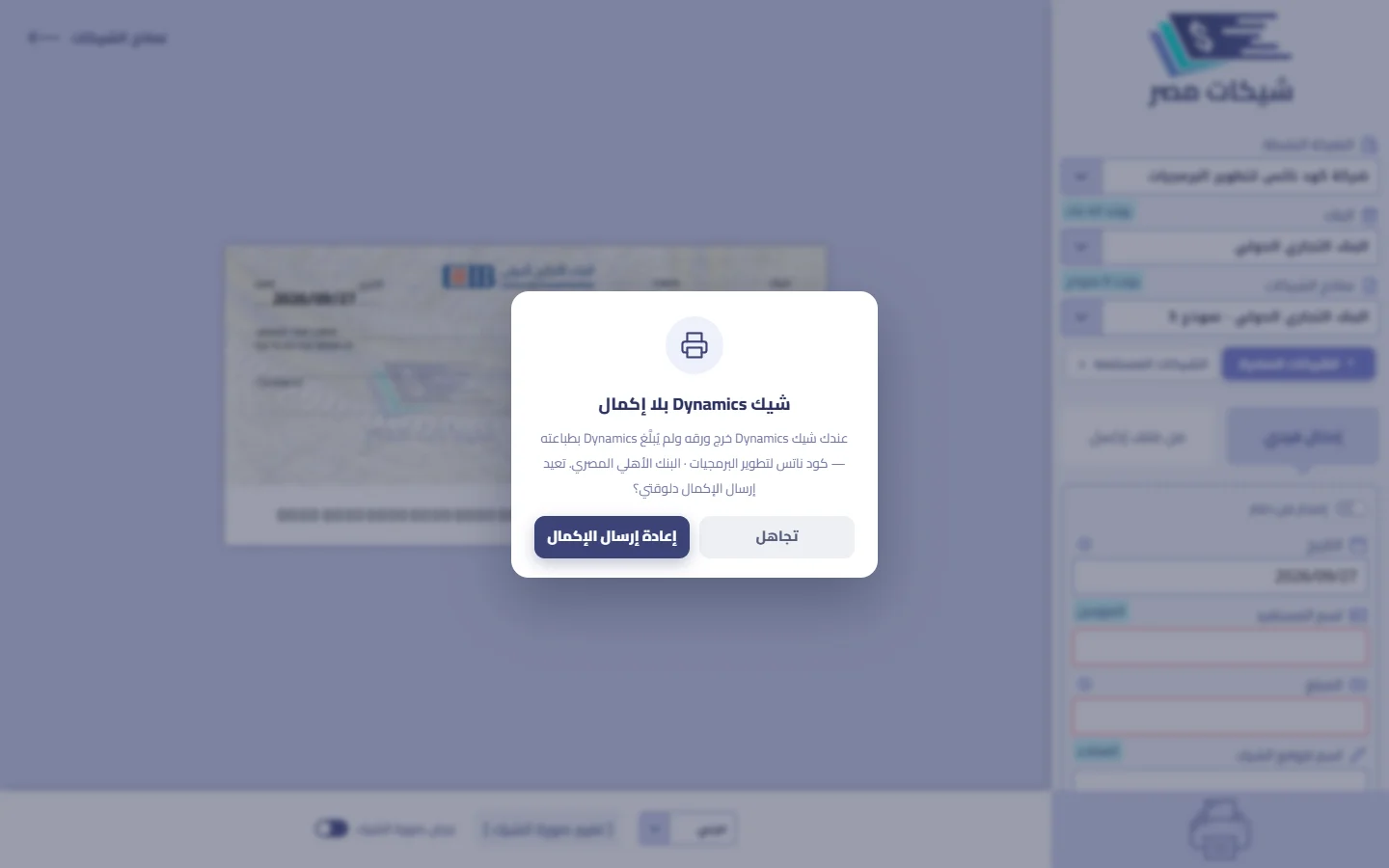
Reloading or closing the page between printing and completion does not lose the cheque: its row was written before the paper, so it appears as «خرج ورقه ولم يُبلَّغ Dynamics» in three places — the offer when the print screen next opens · a card on the cheque page · the “needs attention” item on the dashboard. All of them are one button, «إعادة إرسال الإكمال»: it confirms the print and sends cheque.printed to Dynamics without the cheque image, with launch_token: null.
- Endpoint:
POST /api/cheque-log/{id}/dynamics-resend— session + print-batch permission, and only for the user who printed the cheque. A cheque that is not pending ⟹ok: falsewithcode: "not_pending". - The message states the outcome: confirmed and Dynamics notified (without the image) · confirmed locally, not sent because the link settings are incomplete · confirmed locally, but Dynamics could not be notified.
- The regular “confirm” is refused for a Dynamics cheque — no confirmation without a callback, so this button is the only way out.
Against duplicates — three layers
- Same token twice: the draft holds the registered row ⟹ a second registration 200
reused(«الشيك مسجَّل بالفعل لهذا الإطلاق — جارٍ الطباعة») and a second completion 200reused— the row unchanged (validation and template resolution skipped). - Match by external key:
external_source+external_id(orrequest_hashwhen absent) under a row lock — a printed row is returned untouched and the new payload ignored. - Database constraint:
UNIQUE(external_source, external_id).
request_hash is computed from 17 fields (bank, template, direction, date, payee, amount, currency, number, liner…) and excludes stub fields and account/book/partner IDs. Always send external_id.
Company
Decided at prepare from the key’s company and stored in the draft; registration reads it from there and does not accept a change from the request body. If the key’s company is disabled or deleted between prepare and printing, registration is refused with 422 «شركة هذا الشيك معطَّلة أو محذوفة — لا يمكن إكماله الآن…» before the paper and the draft is untouched — it works again once the company is re-enabled or restored. A prepare payload that contradicts it (company_id or a reference from another company) ⟹ 422. Updating an existing row of a different company: 422 السجل ده مسجّل لشركة تانية. A final row (damaged · cancelled · reissued) refuses updates — and completion — with its own message.
Setup
In the app — the Dynamics tab of the Integration screen, and environment variables on the server:
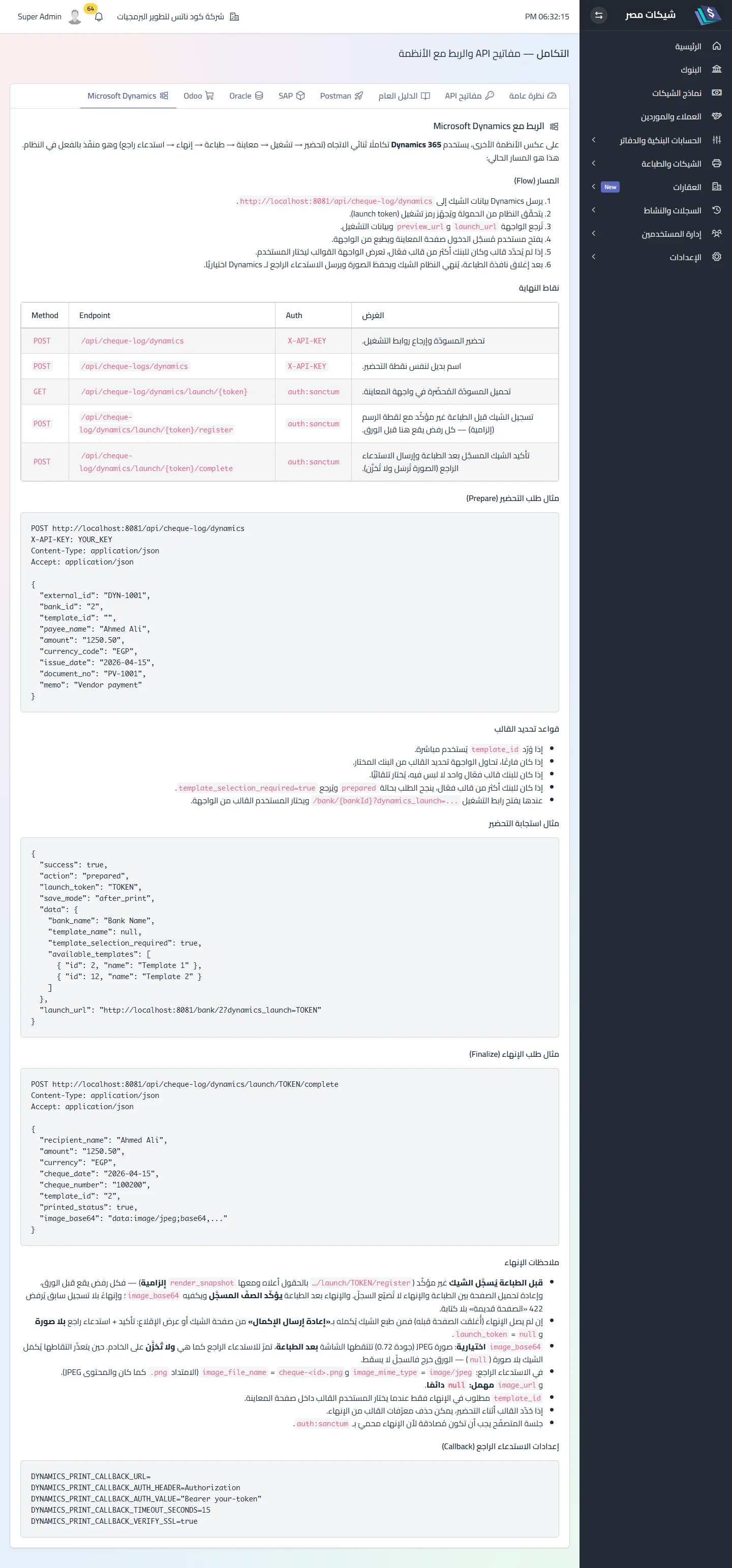
| Variable | Default | Effect |
|---|---|---|
DYNAMICS_PRINT_CALLBACK_URL |
empty | empty ⟹ no call, status skipped |
DYNAMICS_PRINT_CALLBACK_AUTH_HEADER |
Authorization |
sent only with a value |
DYNAMICS_PRINT_CALLBACK_AUTH_VALUE |
— | name and value together are the condition |
DYNAMICS_PRINT_CALLBACK_TIMEOUT_SECONDS |
15 | call timeout |
DYNAMICS_PRINT_CALLBACK_VERIFY_SSL |
true |
false disables certificate checks — never in production |
DYNAMICS_SOURCE |
microsoft_dynamics |
the stamped external_source |
DYNAMICS_LAUNCH_TTL_SECONDS |
3600 | launch token lifetime |
In Dynamics: receive launch_url and show it to an employee logged into Cheques Egypt, and expose an endpoint that accepts the callback and reads event: "cheque.printed" — over HTTPS, because the payload carries the cheque image.
Related
Did this page answer your question?
Thanks — your feedback helps us improve the guide.
Couldn't send — please try again shortly.