
Integration surface — overview for integrators
Three ways to connect: REST endpoints with an API key, the Microsoft Dynamics flow that prepares a cheque and hands printing to an employee, and live push via Pusher — all from one Integration screen and one master switch.
Last updated: 2026-09-28
On this page
Who is this for?
The third-party developer connecting an ERP, accounting system or Dynamics to Cheques Egypt, and the system administrator who manages keys and watches the calls. These pages are a contract reference, not a user guide: every field with its literal rule, every response with an example, every error with its code.
The three shapes
| Shape | What it does | Who starts | Auth |
|---|---|---|---|
| REST with an API key | Record an externally printed cheque as a row in the cheque log · list banks and templates · receive stats | Your system | X-API-KEY |
| Microsoft Dynamics | Prepare a cheque, hand a link to an employee who prints from the normal print screen, then a callback with the result | Dynamics, then a logged-in employee | API key for prepare + the employee’s session for printing |
| Pusher | Live push of reminder/action notifications to the user’s browser | The app | Pusher credentials from Settings |
The “Integration” screen
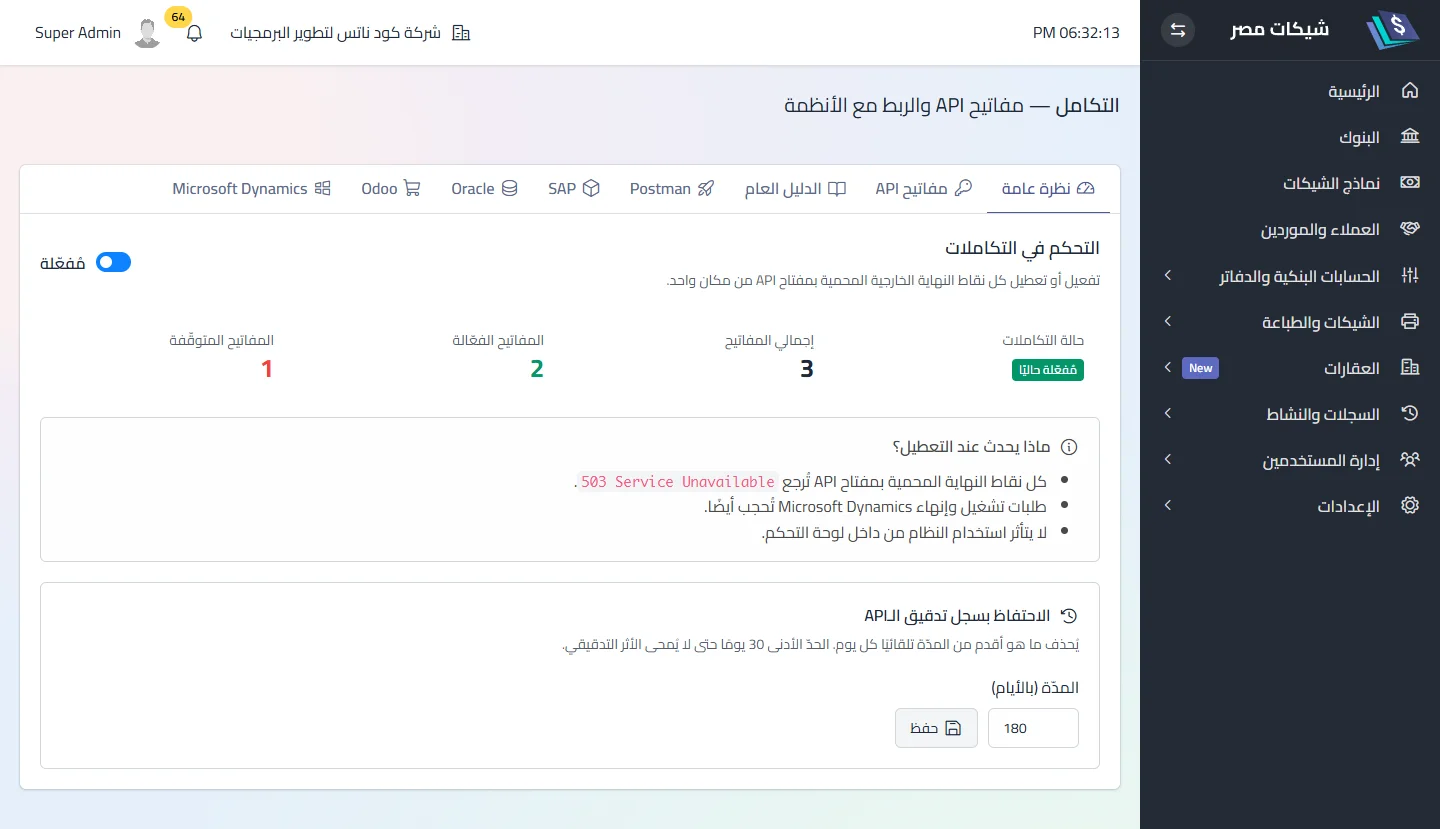
Settings → Integration (permission Manage integrations, in the Settings card of the role form) — eight tabs: Overview (master switch · key counts: total, active and stopped — “stopped” = expired, disabled, with no company, or its company disabled or deleted · and API audit-log retention) · API keys · General guide (in-app explanation) · Postman (download) · SAP · Oracle · Odoo · Microsoft Dynamics — the four system tabs are embedded documentation with a sample .env block, not settings screens.
تنبيه
The master switch in Overview governs every endpoint: off ⟹ every call returns 503 {"error":"Integrations are currently disabled"} no matter how valid the key. A fresh installation ships with it on; check it first on any 503.
Shared headers
X-API-KEY: <key>
Content-Type: application/json      # POST requests
Accept: application/json            # important — without it an HTML error page may come back
Before the first call
- Master switch on.
- An API key created and copied — see API keys.
- The target bank and template active in the app — see Banks and Templates.
- Blocked IPs get a plain-text 403 before any key logic; ask the system administrator.
Current limits of the contract
Stated plainly, so you know before building:
- A key belongs to one company: everything created with it is stamped with that company; a payload carrying a different
company_idor a reference (account · book · partner) from another company is rejected with 422. A key without a company is stopped until one is assigned — see API keys. - No OpenAPI; Postman only — see Quick start.
- Current version 1.8.0; the contract evolves with releases, see What’s new.
Pages in this section
API keys · Banks & templates · Create a cheque directly · Dynamics — flow · Dynamics — fields & template · Receive stats · Pusher · Audit log & security · Error reference · Quick start & Postman
Did this page answer your question?
Thanks — your feedback helps us improve the guide.
Couldn't send — please try again shortly.