
Audit log & security
Every successful write call is logged with its payload after secrets and images are stripped, readable from the API log tab. And, plainly: key scope and company isolation, what is not logged, and what a security officer should do.
Last updated: 2026-09-23
On this page
The audit log
Analytics → API log tab (permission Manage activity log): Date · API client · Endpoint · Status · IP · Payload (an “N fields” button opens JSON). Filters applied to this tab: date, IP and status only.
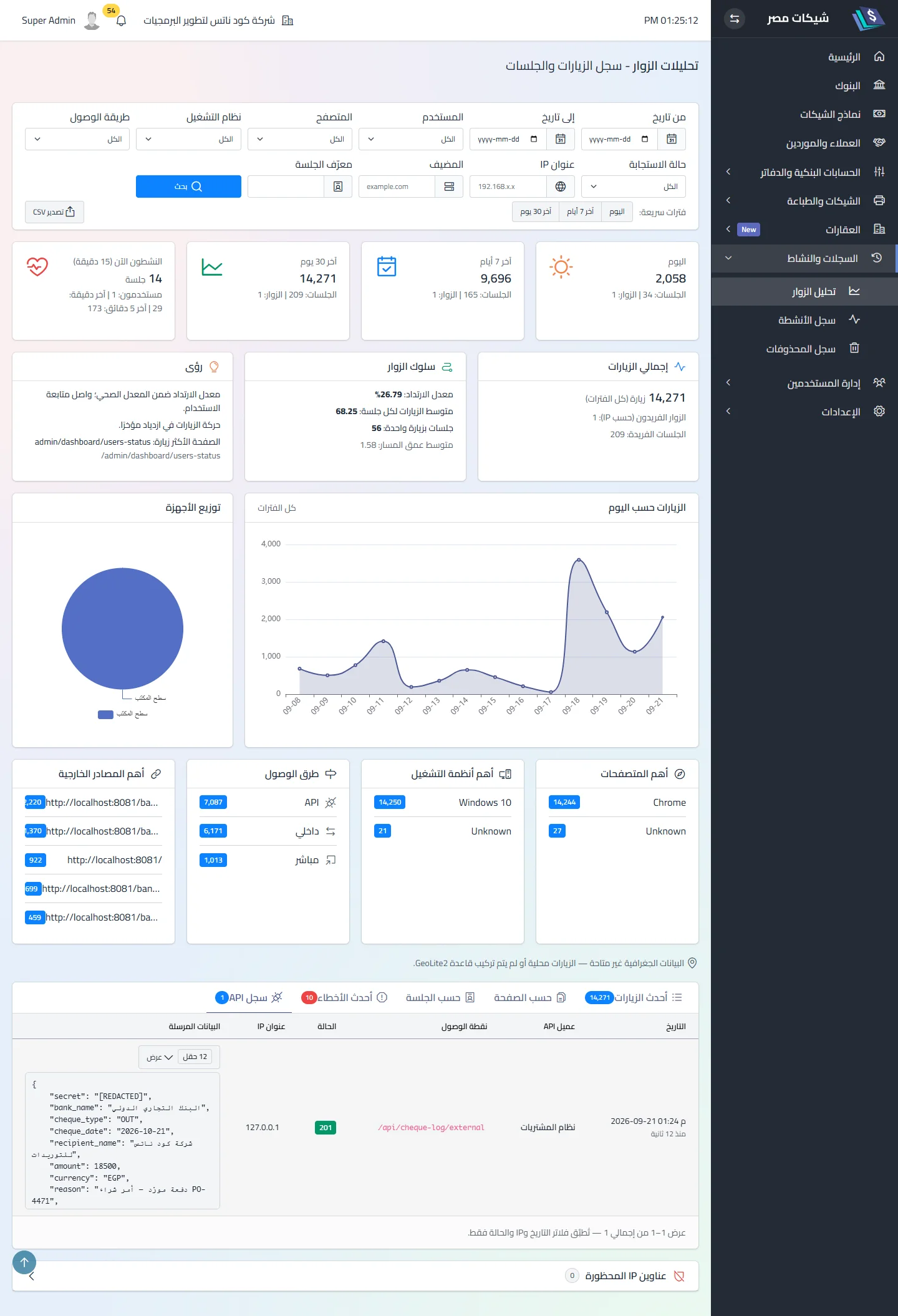
Logged: the three write endpoints (external · dynamics · receive-stats) on success only. Not logged: the read endpoints (banks and templates), rejections (422/500), key rejections in the middleware (503/401/403/429), and Dynamics completion by session. The alias is logged under the original endpoint name. Deleting a key keeps its rows, unattributed.
Company and retention (since 1.8.0): every row is stamped with the key’s company and the tab shows the active company’s rows; pruning is automatic with a retention set in the Overview tab of the Integration screen: 180 days by default, and anything from 30 to 3650 days (the 30-day floor keeps the audit trail from being wiped), running daily. The first run after the update deletes everything older than the retention in one go — so if you hold a large old log, set the retention before that first run. The table is indexed on date, IP, status and company. The “API call audit” unit in Training data reset clears it entirely.
Payload redaction
One definition of “secret” serves write, read and disk:
- 11 patterns (partial, case-insensitive) replaced with
[REDACTED]:secret·api_key·apikey·api-key·token·password·passwd·authorization·auth·signature·private_key—authdeliberately also masksauthor/oauth. - Blocks:
image_base64·base64·image_dataand any string longer than 512 characters ⟹[OMITTED:N chars]. - Keys stay, values disappear — the trace “this field was sent” is preserved.
Key scope and company isolation
A key belongs to one company (since 1.8.0): every cheque created with it is stamped with the key’s company, not the payload’s, and the payload is checked against it — a different company_id ⟹ 422 naming both companies, and a reference (account · book · leaf · partner) from another company ⟹ 422 through the same reference guards the print screen goes through. There is no way to move a cheque to another company from the request body — neither on create nor on Dynamics completion. A key without a company ⟹ an explicit 422. A system serving two companies gets two keys. Changing an existing key’s company is allowed with a confirmation — previously stamped cheques keep their company.
On upgrade from an older release: existing keys are stamped automatically with the only company in a single-company installation; in a multi-company one they stay without a company (stopped) until assigned on the screen — the migration prints their count and names.
What a security officer should know
| Item | State | Recommendation |
|---|---|---|
| Wrong key | no rate limit, no audit line | watch server logs; firewall /api/* to the known systems’ addresses |
| Key in the URL | accepted, leaks into server logs | forbid it in your system; header only |
data response |
the full row (lifecycle columns) | do not store the response as-is |
| Dynamics callback | carries the base64 cheque image | HTTPS mandatory; never disable certificate checks |
| Broadcasting | channel authorised by user identity only | keep Pusher credentials inside the app only |
Permissions
| Permission | Opens |
|---|---|
Manage integrations (manage-integrations) |
the whole Integration screen · Postman download · Pusher tab |
| Manage activity log | Analytics with the “API log” tab |
| Manage print batches (own/all) | completing a Dynamics print from the screen |
Related
Did this page answer your question?
Thanks — your feedback helps us improve the guide.
Couldn't send — please try again shortly.